Nano Banana 2.1: Pokémon Art Prompts and Editing Guide
Nano Banana 2.1 can help turn a character idea into an illustration, change the setting of an existing image, or develop a consistent set of visual assets. For Pokémon fans, the interesting part is taking a random pick and giving it a scene, a mood, and a purpose: a drawing challenge, a team introduction, or a personal wallpaper.
The workflow is straightforward: choose your subject, define the details that must stay, generate a clean first image, then make focused edits. This guide explains how to do that, with adaptable prompts, credit costs, and checks for the mistakes that matter most in character art.
The prompts below are original starting templates, not claims of tested Pokémon outputs. The accompanying diagrams explain the workflow; they are not model-generated artwork.
What is Nano Banana 2.1?
Nano Banana 2.1 is Google’s October 2026 update to Nano Banana 2. Google’s release notes date general availability to October 6 and describe improvements in image quality, prompt following, subject consistency, and text rendering.
Here is how the names fit together:
| Name | What it refers to |
|---|---|
| Nano Banana | The broader image-model family |
| Nano Banana 2 | Gemini 3.1 Flash Image, the predecessor to 2.1 |
| Nano Banana 2.1 | The updated generation and editing model covered here |
| Nano Banana Pro | Gemini 3 Pro Image, a separate model option |
| Google Gemini | Google’s wider AI product and model context |
For character work, improved consistency is useful because the subject often needs to survive a change in background, lighting, or composition. It is still something to check in each result. A recognizable silhouette does not prove every marking, limb, or accessory stayed correct.
To follow the browser workflow, open nano banana 2.1. The interface offers text-to-image generation and image-to-image editing without requiring your own API key. Its account and credits are separate from a Google Gemini subscription.
Start with a random pick, then write a specific brief
An empty prompt box creates a surprisingly large decision: which character, which scene, which style, and which composition? A random selection can resolve the first question so you can concentrate on the others.
Use the Random Pokémon Generator to narrow a selection by generation, region, type, form, or rarity. Choose a small pool if you want a themed challenge, or leave it broad when the surprise is the point. The generator also offers adjustable shiny odds and history controls for revisiting selections.
Those choices select the subject. They do not automatically become an image-generation prompt, and changing the randomizer’s shiny probability does not control the image model.
Suppose your chosen subject is Squirtle. Before asking for a finished illustration, write a brief like this:
Subject: Squirtle, standard appearance
Preserve: blue body, recognizable shell, curled tail, familiar proportions
Scene: a quiet stream with smooth stones
Action: standing beside the water, looking toward the viewer
Composition: full body visible, no overlapping foreground objects
Style: clean illustrated shapes with soft natural lighting
Use: a personal drawing-challenge image
This is a hypothetical selection, not a recorded randomizer result. The point is to move from a name to a set of observable requirements.
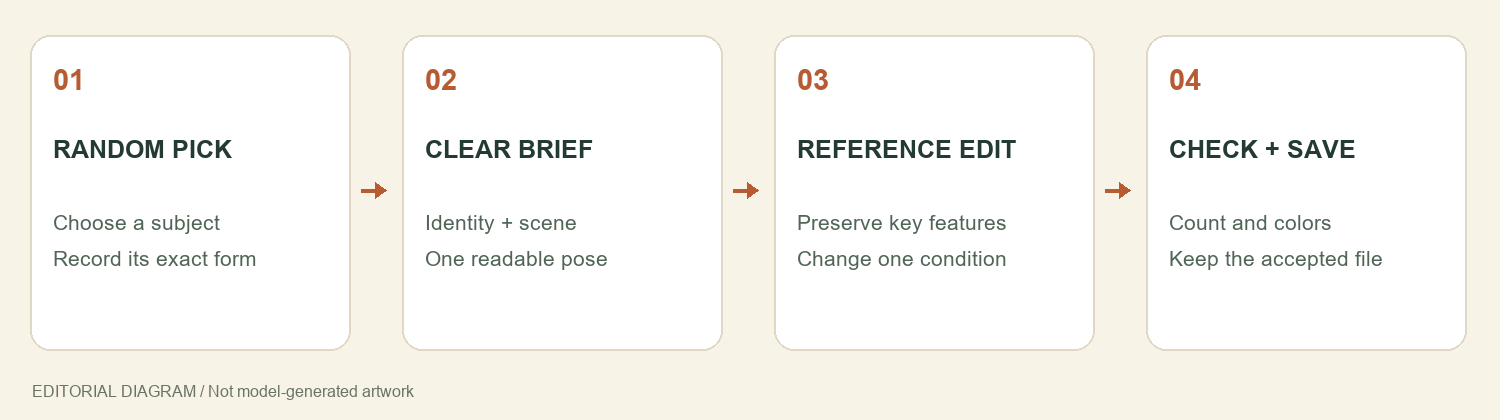
An editorial workflow diagram. Random selection chooses the subject; the prompt defines the image task.
Write a Nano Banana 2.1 prompt around five decisions
A useful prompt describes subject, identifying details, action, setting, and framing. Style can then support those decisions instead of replacing them with a pile of adjectives.
Compare “an epic Pokémon picture, highly detailed” with “one full-body character standing beside a stream, its shell and tail unobstructed.” The second gives you something concrete to inspect when the result arrives.
Prompt 1: a single-character scene
Replace the bracketed fields with the selection and features you want to preserve:
Create a full-body fan-art illustration of [POKÉMON AND EXACT FORM].
Preserve these identifying features: [BODY SHAPE], [MARKINGS],
[KEY FEATURE], and [STANDARD OR SHINY COLOR PALETTE].
The character is [SIMPLE ACTION] in [SETTING].
Use [VISUAL MEDIUM] with [LIGHTING] and a restrained [COLOR PALETTE].
Keep the entire character visible, with clear space around its outline.
Include one character only. No extra limbs, duplicate characters,
lettering, logos, or objects covering the identifying features.
Start with a simple pose and an uncluttered setting. Complex movement, several characters, dramatic perspective, and small text all introduce additional things to judge.
In Nano Banana 2.1, choose Text to Image, select your output settings, and generate the draft. A 1K image is a practical first check for composition. Save the accepted result with its prompt so you can use the actual image as a reference later.
When a reference image is worth using
A species name may be enough to explore an idea, but a specific form or color variation needs a more precise reference. Use an image you have permission to use, and identify which details it establishes.
For a shiny character, write down the intended palette rather than expecting the word “shiny” to resolve every detail. For alternate forms, name the form explicitly. Inspect the finished image against that reference before treating it as a faithful depiction.
If you are inventing a new creature instead, describe original anatomy and markings and label the result as an original concept. A random Pokémon can inspire a theme without making the new design an official species.
Edit the scene without losing the character
Once you have a first image you like, switch from describing everything again to specifying an edit. Nano Banana 2.1’s image-to-image workflow gives you a concrete starting point, but the instruction still needs to separate what stays from what changes.
Prompt 2: a new environment for an accepted image
Use the uploaded character image as the reference.
Keep the same character identity, form, body proportions, facial features,
markings, color palette, pose, and camera angle.
Change only the environment to [NEW SETTING].
Match the scene lighting while preserving the character's identifying colors.
Keep its full outline visible. Do not add characters or change accessories.
No lettering or logos.
Try this in nano banana 2.1 by selecting Image to Image and uploading the accepted draft. After each edit, compare the identifying features before deciding which file becomes the next reference.
If the tail or face changes unexpectedly, return to the last accepted version and simplify the request. A background-only edit is easier to assess than one that also changes the pose, outfit, style, and camera angle.
Do not assume the browser interface remembers every earlier choice. Upload the image you intend to preserve for the next request. This also avoids carrying an unnoticed error through the rest of a series.
Build a team image in manageable stages
Team pictures introduce a different problem: the model has to place several distinct subjects without merging their features. A correct individual portrait can become an extra tail, a missing member, or the wrong colors in a crowded scene.
For a first Nano Banana 2.1 team experiment, begin with two or three subjects. Assign positions and keep the action simple. If you need a complete six-member presentation, separate portraits arranged in a design editor give you more control over names and spacing.
Prompt 3: a small team composition
Create one wide fan-art scene with exactly three distinct characters.
Use reference 1 for [CHARACTER A] on the left,
reference 2 for [CHARACTER B] in the center,
and reference 3 for [CHARACTER C] on the right.
Preserve each character's own markings, colors, anatomy, and form.
All three stand on the same ground plane in [SETTING].
Keep every character fully visible and separated by clear gaps.
Use consistent lighting and one visual medium throughout.
Do not merge features, add background characters, or include text.
This is an untested template. Reference numbers describe your intended correspondence; verify that the result follows it. The ability to upload multiple references is not a guarantee that every reference will be assigned perfectly.
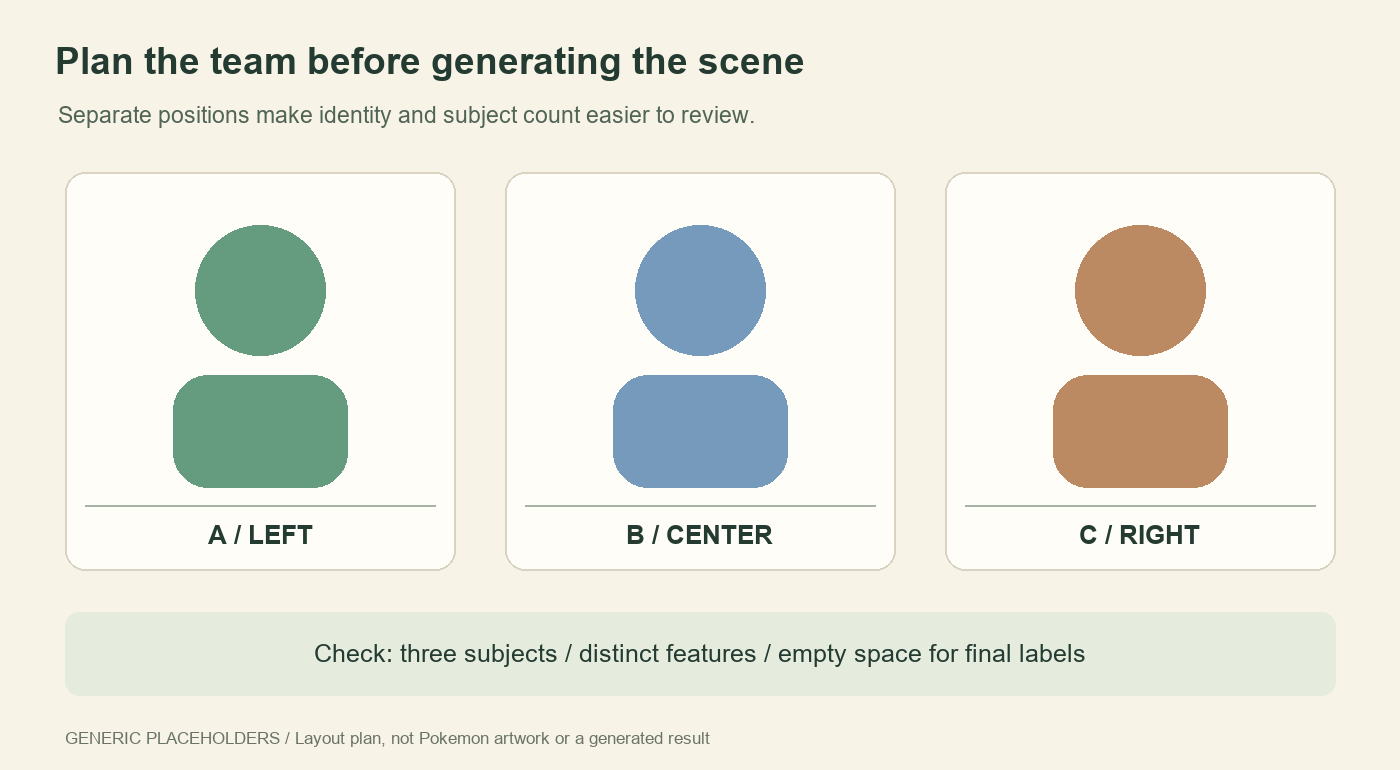
A layout plan using generic placeholders, not Pokémon artwork or a generated result. Clear separation makes missing or merged subjects easier to spot.
For a team card, leave empty space below each portrait and add names, types, and other details after choosing the images. Generated text should not become your source of game information. Keep the selected game version, form, and relevant stats in a separate record.
Nano Banana 2.1 settings and credit costs
The checked browser-service rates on October 9, 2026 are:
| Resolution | Credits per request | Useful starting point |
|---|---|---|
| 1K | 2 | Subject, pose, and composition drafts |
| 2K | 3 | A larger version to inspect and refine |
| 4K | 4 | Artwork needing more pixels for cropping or display |
New accounts receive 5 starter credits. These are an initial allowance, not unlimited or daily free generations. Check the cost shown before submitting each request.
A first draft and one 1K edit would use 4 credits at those rates. A 1K draft followed by a 4K edit would use 6, so that sequence exceeds the starter allowance. Retries also need a budget.
Choose resolution after deciding what problem remains. A bigger image does not fix a wrong form, an extra limb, or a missing team member. JPG and PNG are export choices; selecting PNG alone does not guarantee a transparent background.
Nano Banana 2.1 vs Nano Banana 2 and Nano Banana Pro
Search results often turn model choice into a single winner. For character art, your own acceptance criteria matter more: did the output preserve the face, keep the correct form, follow the requested pose, and remain useful after editing?
Nano Banana 2.1 is the updated model discussed here. Nano Banana 2 results in older tutorials can illustrate prompting ideas, but their behavior and prices should not be assumed to match the update. Nano Banana Pro is a separate option, not another spelling of 2.1.
If you compare Nano Banana Pro with this workflow, reuse the same reference, brief, and output target. Count the attempts needed to get an acceptable image. A single attractive example cannot establish a universal quality or speed ranking.
Google Gemini tutorials may also describe a different interface from the browser service used here. Match the instructions to the controls you can actually see, especially for editing, subscriptions, and credit balances.
Fix the mistakes that matter in Pokémon images
| Problem | What to inspect | A useful next change |
|---|---|---|
| Wrong form or palette | Exact form name and reference | Specify the form and defining colors |
| Character changes during editing | Face, outline, markings, tail | Reuse the last accepted image and reduce the edit |
| Team members merge | Subject count and separation | Use fewer characters or compose separate portraits |
| Text is misspelled | Every visible label | Shorten the text or add labels afterward |
| A “shiny” looks like a lighting effect | Actual body colors | Describe the palette and use a suitable reference |
Google’s model card still notes imperfect character consistency and difficulty with small text. Treat those as reasons to inspect your output, rather than assuming an improved model removes the need for review.
Can Nano Banana 2.1 make accurate Pokémon stats or game assets?
It can create an illustration containing numbers, but that does not establish whether the numbers are correct. Verify game data separately. A picture is also not an importable game character, a playable team, or a ROM modification.
Can I use these images commercially?
Access to an image tool does not grant rights to Pokémon characters or branding. For a commercial project, check the relevant rights and service terms. Keep fan-art labels clear and avoid presenting a generated image as an official release or newly confirmed form.
Is this also a video workflow?
The steps here produce still images. This guide does not describe a video-generation feature. For a supplementary look at image examples, watch Nano Banana 2.1 Is FINALLY Here (I Tested Everything) by Youri van Hofwegen. It is a separate creator’s demonstration, not evidence that the templates above were tested.
Give your next random pick one clear task
Choose a subject, record its form and palette, and decide on a single scene. Then make a draft in nano banana 2.1 and judge it against those decisions before requesting a new variation.
A useful first goal is modest: one recognizable character, one readable silhouette, and one setting that supports the idea. That gives you a dependable reference for the next edit—and a more satisfying result from the original random choice.
Updated October 9, 2026. Workflow diagrams are editorial illustrations. Prompt templates have not been generation-tested; model behavior and displayed credit rates may change.
Related resources
For more Nano Banana 2.1 reading and community posts, explore these resources alongside your next creative brief: